PKI Crash Course with OpenSSL
Learn Public Key Infrastructure Crash Course

Public Key Infrastructure Crash Course with OpenSSL
What is Cryptography?
Cryptography is the science of securing information so that only intended parties can understand it. It protects data at rest and in transit using mathematical techniques.
Let’s look at the three components of it:
Encryption

The primary goal of encryption is to protect data confidentiality. Even if someone intercepts the data, they will not be able to understand its contents without the appropriate key.
Decryption
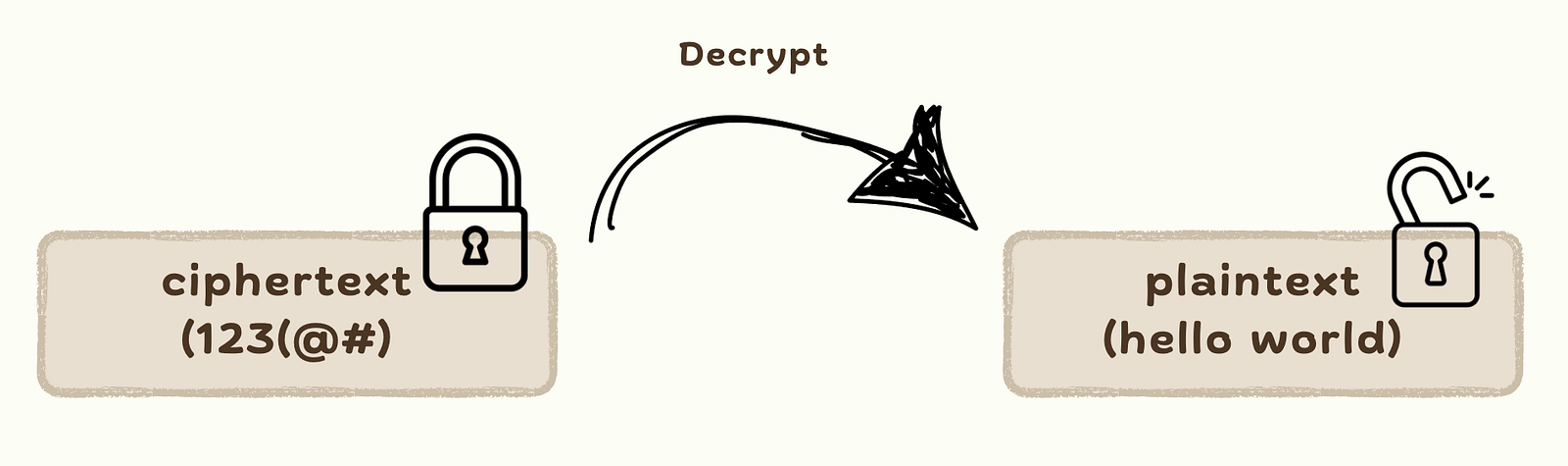
Only parties with the correct key should be able to decrypt and read the data.
Key
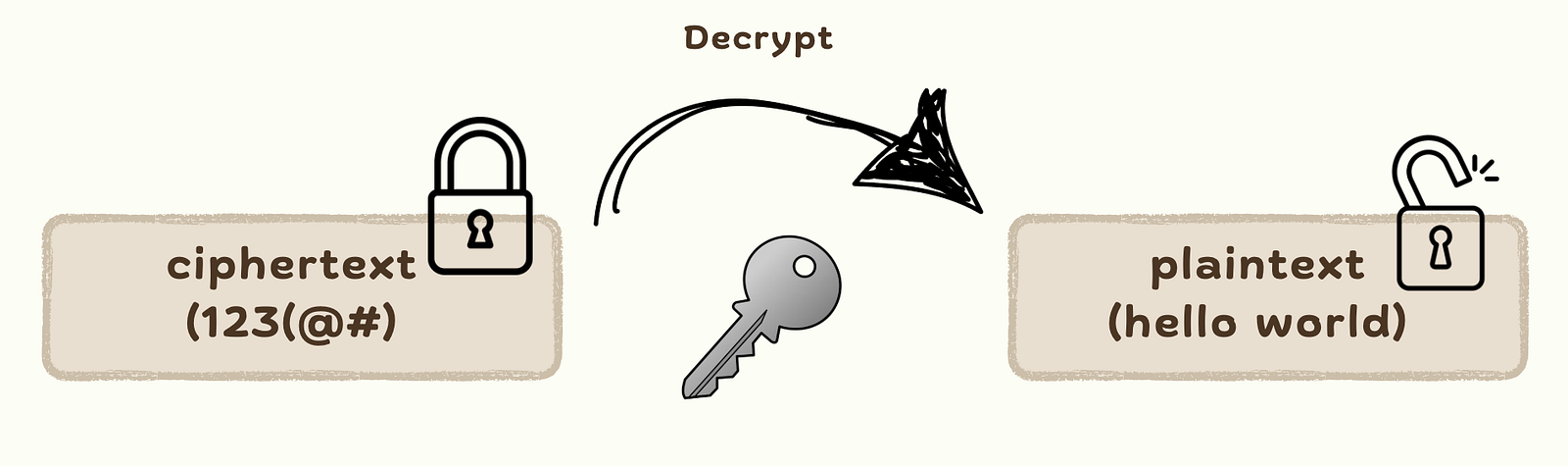
The strength of encryption depends on both the algorithm used and the length and randomness of the key. Keys must be kept secure - if a key is compromised, so is the data it protects.
Symmetric Cryptosystems
A symmetric cryptosystem is a type of encryption in which the same secret key is used for both encryption and decryption of data. The sender and receiver must both possess this key and keep it confidential.
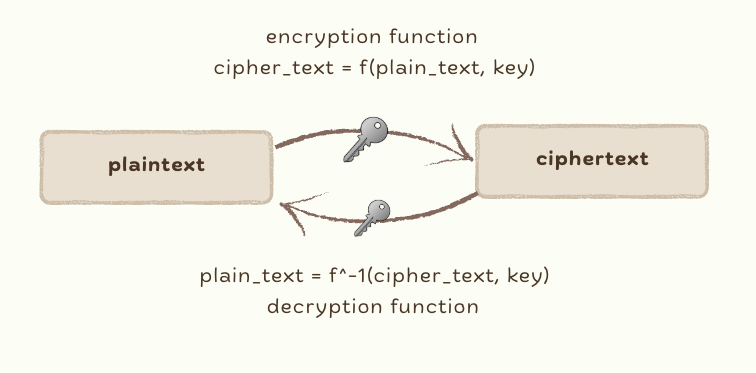 We use the same key both for encryption and for decryption. This is why these approaches are symmetric. So we use the same key both for encryption and for decryption.
Symmetric cryptosystems use just a single key both for encryption and for decryption as well
THIS IS WHY IT IS CALLED PRIVATE KEY CRYPTOSYSTEM OR SYMMETRIC CRYPTOSYSTEM !!!
We can use a key in order to generate the cipher text. And we can use the same key in order to generate the plaintext from the cipher text.
Disadvantages of this approach:
- The main problem is that this private key must be exchanged and there are a huge number of keys in a network of users.
Symmetric encryption is often used when:
- Speed is essential: symmetric algorithms are generally faster and more efficient than asymmetric ones.
- The communication is between trusted parties: where secure key exchange is feasible (e.g., internal systems, secure file storage, VPN tunnels).
Examples:
- Encrypting local data at rest (e.g., database fields, files, backups).
- Securing communication over a private channel.
- Streaming media encryption where performance is a priority.
Algorithm that uses symmetric cryptosystem / private keys:
- Caesar cipher
- Vigenere cipher
- Data Encryption Standard
- Advanced Encryption Standard
Caveat:
- If we use symmetric cryptosystems, then we have to use an extremely large amount of unique private keys. That is not the best approach possible. This is why we can use different keys for encryption and for decryption. And this how we can reduce the number of keys in the network. And this is exactly what happens with cryptocurrencies.
Asymmetric Cryptosystems
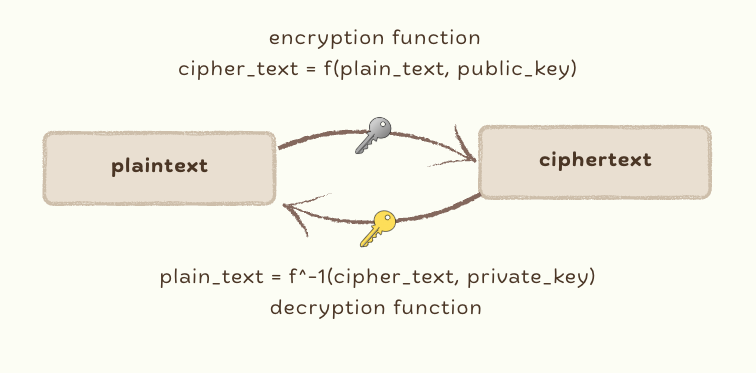 An asymmetric cryptosystem (also known as public-key cryptography) uses a pair of cryptographic keys:
- A public key, which can be shared openly.
- A private key, which must be kept secret.
Key principle:
- What one key encrypts, only the other key can decrypt.
Summary:
- We must keep the private key private.
- The public key is known to anyone in the network
- If Vento wants to send a message to Deco then Vento encrypts the message with Deco’s public key and Deco can decrypt the message with his own private key.
Asymmetric cryptography solves the key distribution problem found in symmetric systems. It is commonly used in scenarios where secure key exchange and identity verification are critical.
Common use cases include:
- Secure key exchange (e.g., TLS/SSL)
- Digital signatures (e.g., document verification, software integrity)
- Authentication and identity (e.g., SSH login, JWT tokens)
- Certificate-based trust models (e.g., Public Key Infrastructure)
How to Generate Private Key and Public Key using OpenSSL
Before we look at OpenSSL commands, it’s important to understand what you’re generating - and why the algorithm matters.
RSA (Rivest–Shamir–Adleman) Cryptosystem
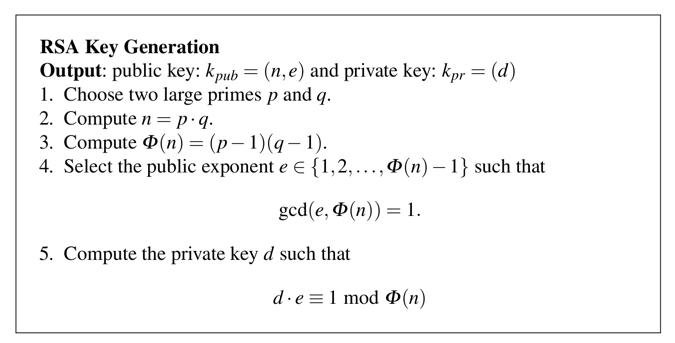 RSA is one of the earliest and most well-established public-key cryptographic algorithms. It is based on the mathematical challenge of factoring large prime numbers.
RSA’s security depends on the difficulty of factoring the product of two large prime numbers. The private and public keys are mathematically linked, and key sizes typically range from 2048 to 4096 bits for strong security.
Caveats
- Performance: RSA is relatively slow and is generally used to encrypt small payloads (e.g., symmetric keys, hashes).
- Key size: Requires larger keys than ECC for equivalent security. For example, RSA-2048 offers roughly the same security level as ECC with a 224-bit key.
- Quantum threat: RSA is more vulnerable to future quantum attacks than ECC (e.g., Shor’s algorithm).
Generate RSA Key Pair using OpenSSL
// to generate the private key
$ openssl genrsa -out rsa-key.pem 2048

// check the private key base64 encoded value
$ cat rsa-key.pem
-----BEGIN PRIVATE KEY-----
MIICdgIBADANBgkqhkiG.......
-----END PRIVATE KEY-----

// generate public key
$ openssl rsa -in rsa-key.pem -pubout -out rsa-pub.pem

// check public key base64 encoded value
$ cat rsa-pub.pem
-----BEGIN PUBLIC KEY-----
MIIBIj.......
-----END PUBLIC KEY-----

// to check the private key details components
$ openssl rsa -text -in rsa-key.pem -noout
Private-Key: (2048 bit, 2 primes)
modulus:
    00:e3:...
publicExponent: 65537 (0x10001)
privateExponent:
    28:29:...
prime1:
    00:fe:...
prime2:
    00:e5:...
exponent1:
    53:73:...
exponent2:
    00:82:...
coefficient:
    00:81:...
Data communication using RSA
// create dummy data
$ echo "Hello World" > input.txt

// encrypt data using public key
$ openssl pkeyutl -encrypt -inkey rsa-pub.pem -pubin -in input.txt -out encrypted-file.txt

// check encrypted data
$ cat encrypted-file.txt
Y'�].....

// decrypt data using private key
$ openssl pkeyutl -decrypt -inkey rsa-key.pem -in encrypted-file.txt -out result.txt

// check decrypted data
$ cat result.txt
Hello World
Elliptic Curve Cryptography (ECC)
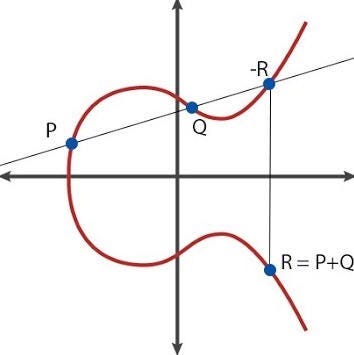
ECC is a modern public-key cryptography system based on the algebraic structure of elliptic curves over finite fields. It achieves similar levels of security to RSA but with much smaller key sizes and better performance. Instead of relying on prime factorization, ECC relies on the Elliptic Curve Discrete Logarithm Problem, which is computationally hard to solve.
Caveats
- Implementation complexity: ECC is more difficult to implement correctly, and poor implementation can lead to vulnerabilities.
- Interoperability: Not all systems or protocols support ECC, although adoption is growing.
- Curve choice: You must carefully choose a trusted curve (e.g., prime256v1, secp384r1). Some curves are deprecated or considered insecure.
Generate ECC Key Pair using OpenSSL
// to generate the private key
$ openssl ecparam -genkey -name prime256v1 -out ecc-key.pem

// check the private key base64 encoded value
$ cat ecc-key.pem
-----BEGIN EC PARAMETERS-----
Bggq.....
-----END EC PARAMETERS-----
-----BEGIN EC PRIVATE KEY-----
MHcC....
-----END EC PRIVATE KEY-----

// generate public key
$ openssl ec -in ecc-key.pem -pubout -out ecc-pub.pem

// check public key base64 encoded value
$ cat ecc-pub.pem
-----BEGIN PUBLIC KEY-----
MIIBIj.......
-----END PUBLIC KEY-----

// to check the private key details components
$ openssl ec -in ecc-key.pem -text --noout
read EC key
Private-Key: (256 bit)
priv:
    8c:b6:...
pub:
    04:66:...
ASN1 OID: prime256v1
NIST CURVE: P-256
Data communication using ECC
ECC (Elliptic Curve Cryptography) is not typically used for direct encryption. Instead, it is commonly used to establish a shared secret key (e.g., for AES) between the sender and receiver. This shared key is then used for actual encryption and decryption. In most use cases, ECC is primarily employed for digital signatures, where the goal is to verify the sender’s identity rather than encrypt data directly.
Let’s break for some time and criticize the article above, we will have a lot of questions, right? Some of them are
What is PEM?
PEM (Privacy Enhanced Mail) format refers to the base64 wrapper for a binary format contained within but does not specify any type of format for the binary data so that a PEM file may contain almost anything base64 encoded and wrapped with BEGIN and END lines.
2. Why does AES use a public key to encrypt the data? and not using the private key?
Actually it depends on the main goals. Let’s break it down:
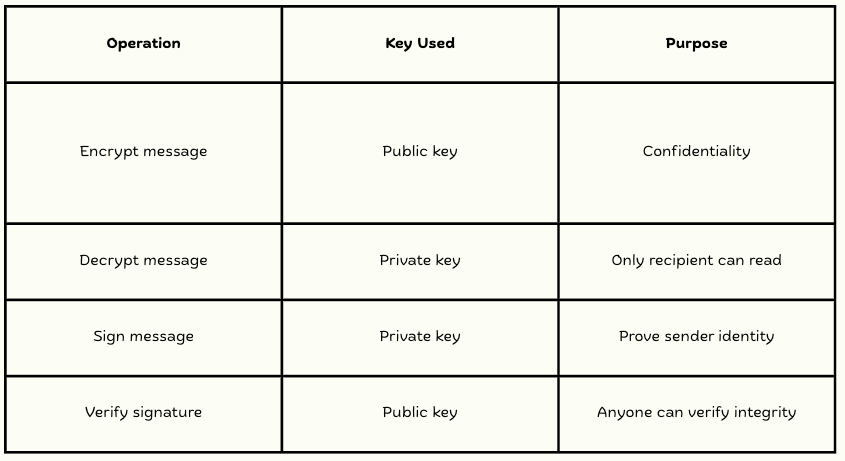 So, when someone encrypts a message with your public key, only you can decrypt it with your private key. This is useful for secure key exchange and identity verification. So, now it matters to know about the confidentiality of the sender, and how we prove it. The term of identity verification is usually we can call it certificate. What is Certificate then?
Certificates
What is a Certificate?
A digital certificate is a cryptographically signed document that binds a public key to an entity (such as a person, organization, or website). It ensures that the public key belongs to that entity and hasn’t been tampered with.
In simpler terms:
A certificate acts like a digital passport that proves the identity of someone (or something) and securely shares their public key.
Certificates are typically issued by a Certificate Authority (CA) and follow the X.509 standard.
Certificates in a public key cryptosystem, every member of the network has 2 keys: public key and private key.
OTHERS CAN USE MY PUBLIC KEY TO ENCRYPT A MESSAGE THAT CAN BE DECRYPTED BY MY PRIVATE KEY!!!
and we can use public and private keys for digital signature algorithms (verify that a given message belongs to a given user in the network).
Why do We Need a Certificate?
We could identify the members of the network with public keys exclusively - but sometimes we need additional information (and it adds another layer of security)
A public key certificate is a digitally signed document that serves to validate the sender’s authorization and name.
A CERTIFICATE IS GENERATED AND ISSUED BY A TRUSTED THIRD PARTY (CERTIFICATE AUTHORITY)
It uses a cryptographic structure that binds a public key to an entity such as a user or organization.
Real-World Example
Let’s say you visit https://medium.com. Your browser checks the certificate presented by the website to ensure:
- It was issued by a trusted CA (like Let’s Encrypt, DigiCert, etc.)
- It is still valid (not expired or revoked).
- The certificate’s domain name matches the site you’re visiting.
- It has not been tampered with (validated by the signature).
If all checks pass, the connection is marked secure.
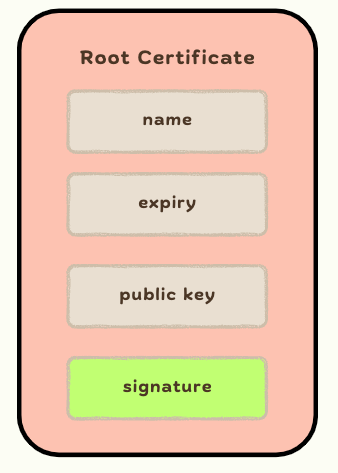
Root Certificate
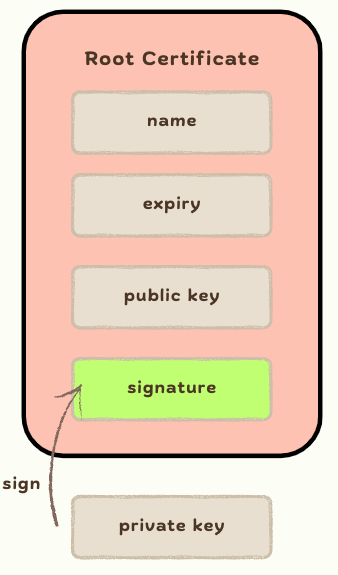
A root certificate is a public key certificate that identifies the root certificate authority (CA).
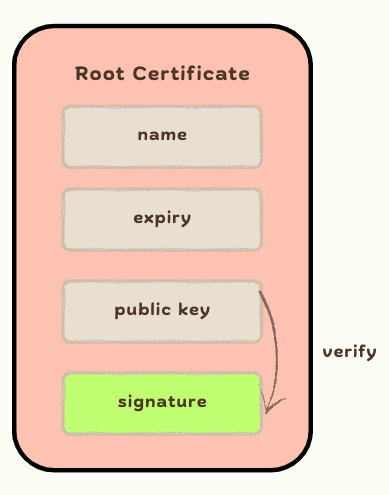
A ROOT CERTIFICATE IS SELF-SIGNED SO THE SIGNATURE IS GENERATED BY ITS OWN PRIVATE KEY !!!
So we can verify these certificates by their own public keys - essentially we trust these certificates by default (Apple, Google, Komdigi, etc.)
Intermediate Certificate
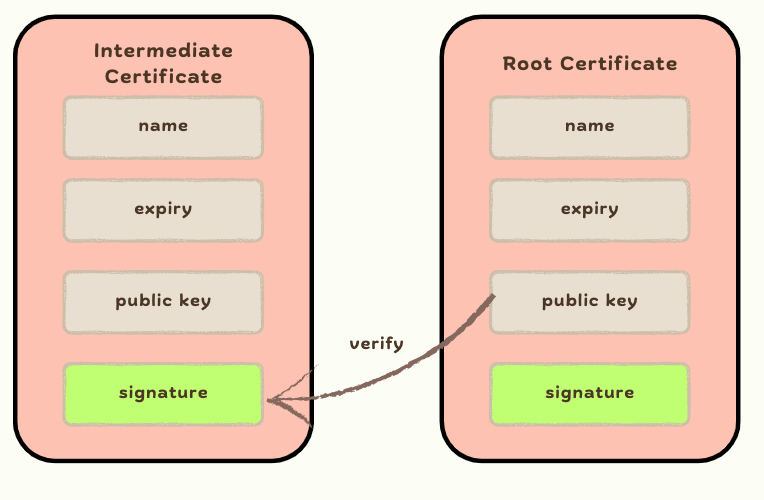
An intermediate certificate is a public key certificate that is signed and accepted by a certificate authority (CA)
AN INTERMEDIATE CERTIFICATE IS SIGNED BY A ROOT CERTIFICATE !!!
so we can verify these certificates by the public keys of the issuers (root certificates)
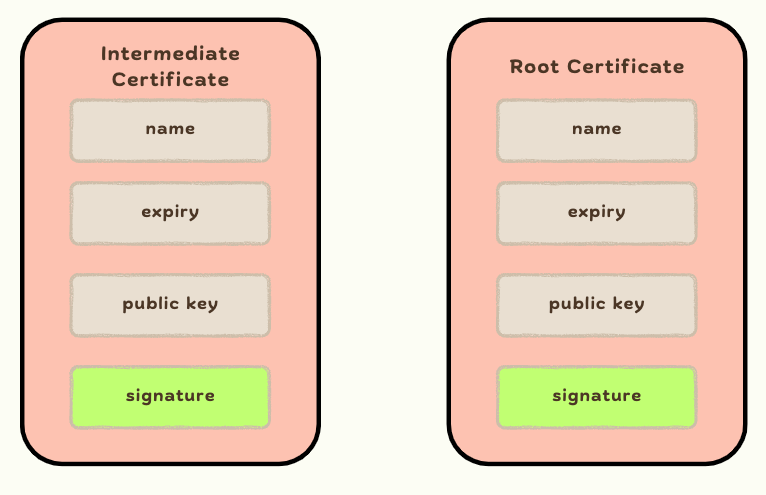 To sign the intermediate certificate we need to use private key issuer (root certificate) and give some details like distinguished name (organization name, person name, location, etc.) also the public key itself.
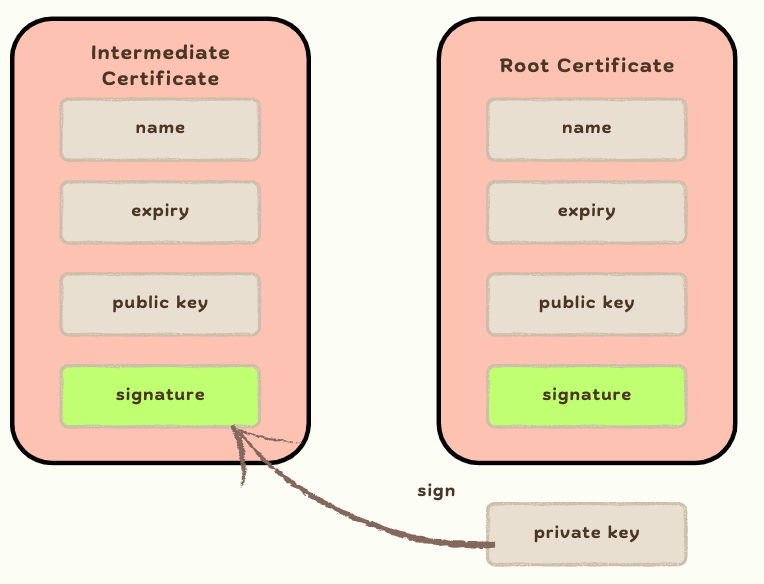 Then we can verify the validity of the intermediate certificate using the root certificate.
How to Create Root and Intermediate a Certificate?
Create a Root Certificate (Self-Signed) using OpenSSL
// create ca private key
$ openssl genrsa -out ca-key.pem 2048

// create certificate configuration
$ vi certificate.conf
distinguished_name = req_distinguished_name
x509_extensions = v3_extensions
prompt = no

[ req_distinguished_name ]
countryName = ID
stateOrProvinceName = Jakarta
localityName = Jakarta
organizationName = GoTo
organizationalUnitName = GoTo
commonName = ventodeco-root.my.id

[ v3_extensions ]
subjectKeyIdentifier = hash
# copies the subject key identifier (or if it fails then it uses the issuer and serial number)
authorityKeyIdentifier = keyid:always
# whether the certificate is a root or not
basicConstraints = critical, CA:TRUE, pathlen:2
# key usage - use the certificate for signing or key encipherment
keyUsage = keyCertSign, digitalSignature, keyEncipherment


// generate certificate
$ openssl req -x509 -sha256 -days 365 -key ca-key.pem -out ca-root-cert.pem -config certificate.conf

// Check certificate details
$ openssl x509 -in ca-root-cert.pem -text -noout
Certificate:
    Data:
        Version: 3 (0x2)
        Serial Number:
            44:86:...
        Signature Algorithm: sha256WithRSAEncryption
        Issuer: C=ID, ST=Jakarta, L=Jakarta, O=GoTo, OU=GoTo, CN=ventodeco-root.my.id
        Validity
            Not Before: Apr 11 06:20:19 2025 GMT
            Not After : Apr 11 06:20:19 2026 GMT
        Subject: C=ID, ST=Jakarta, L=Jakarta, O=GoTo, OU=GoTo, CN=ventodeco-root.my.id
        Subject Public Key Info:
            Public Key Algorithm: rsaEncryption
                Public-Key: (2048 bit)
                Modulus:
                    00:a7:....
                Exponent: 65537 (0x10001)
        X509v3 extensions:
            X509v3 Subject Key Identifier:
                DA:43:...
            X509v3 Authority Key Identifier:
                DA:43:...
            X509v3 Basic Constraints: critical
                CA:TRUE, pathlen:2
            X509v3 Key Usage:
                Digital Signature, Key Encipherment, Certificate Sign
    Signature Algorithm: sha256WithRSAEncryption
    Signature Value:
        77:e6:....

// Since this is self signed, we can verify it with same file
$ openssl verify -CAfile ca-root-cert.pem ca-root-cert.pem
```output
ca-root-cert.pem: OK
Create an Intermediate Certificate
// create ca private key
$ openssl ecparam -genkey -name prime256v1 -out ecc-key.pem

// create CSR configuration
$ vi certificate-csr.conf
[ req ]
distinguished_name = req_distinguished_name
prompt = no

[ req_distinguished_name ]
countryName = ID
stateOrProvinceName = Wonogiri
localityName = Wonogiri
organizationName = Mi Ayam Wonogiri Uyee!!!
organizationalUnitName = Mi Ayam Wonogiri Uyee!!
commonName = ventodeco-intermediate.my.id


// create CSR
$ openssl req -key ecc-key.pem -new -out ecc-inter-cert-csr.pem -config certificate-csr.conf

// check details of CSR
$ openssl req -in ecc-inter-cert-csr.pem -text

// generate certificate using root private key
$ openssl x509 -req -CA ca-root-cert.pem -CAkey ca-key.pem -in ecc-inter-cert-csr.pem -out intermediate-cert.pem -days 365

// Check intermediate certificate details
$ openssl x509 -in intermediate-cert.pem -text -noout
Certificate:
    Data:
        Version: 3 (0x2)
        Serial Number:
            28:88:....
        Signature Algorithm: sha256WithRSAEncryption
        Issuer: C=ID, ST=Jakarta, L=Jakarta, O=GoTo, OU=GoTo, CN=ventodeco-root.my.id
        Validity
            Not Before: Apr 11 06:44:09 2025 GMT
            Not After : Apr 11 06:44:09 2026 GMT
        Subject: C=ID, ST=Wonogiri, L=Wonogiri, O=Mi Ayam Wonogiri Uyee!!!, OU=Mi Ayam Wonogiri Uyee!!, CN=ventodeco-intermediate.my.id
        Subject Public Key Info:
            Public Key Algorithm: id-ecPublicKey
                Public-Key: (256 bit)
                pub:
                    04:2d:...
                ASN1 OID: prime256v1
                NIST CURVE: P-256
        X509v3 extensions:
            X509v3 Subject Key Identifier:
                2F:B3:...
            X509v3 Authority Key Identifier:
                DA:43:...
    Signature Algorithm: sha256WithRSAEncryption
    Signature Value:
        32:17:...

// Since this is intermediate certificate, we need to verify it with root certificate
$ openssl verify -CAfile ca-root-cert.pem ca-root-cert.pem
```output
intermediate-cert.pem: OK
Chain of Trust
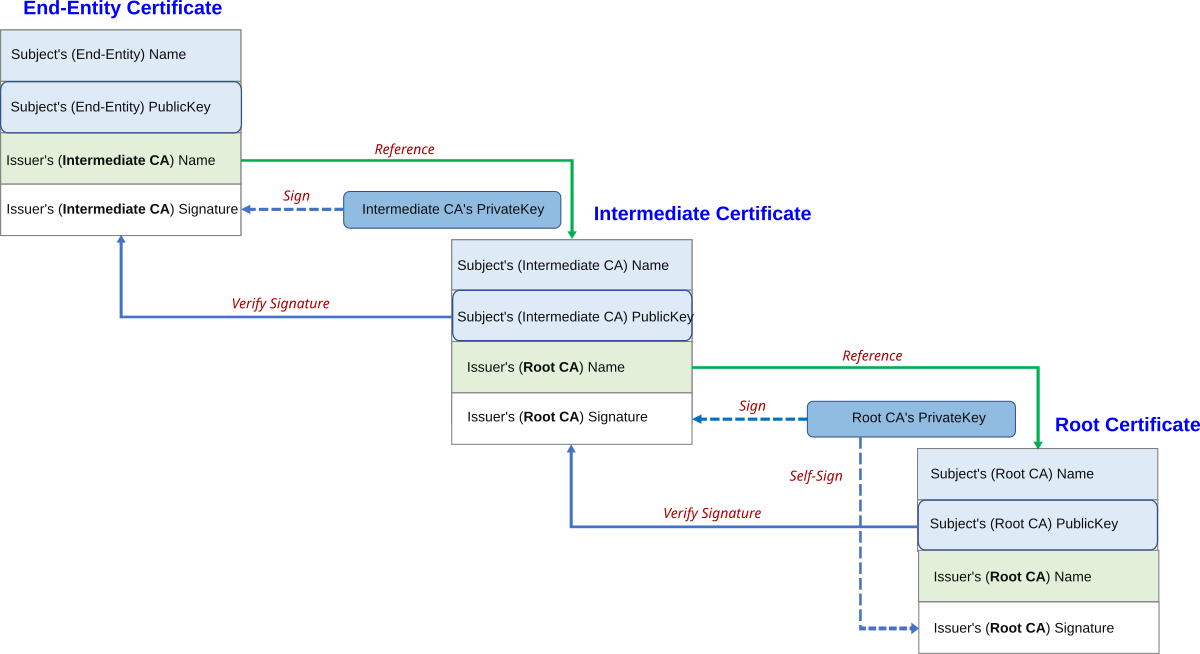 The Chain of Trust is a hierarchical model used to validate digital certificates. It starts with a trusted Root Certificate Authority (CA) and ends with an end-entity certificate (e.g., a website’s SSL/TLS cert / User). Each certificate in the chain is signed by the private key of the certificate above it in the hierarchy.
So basically we don’t directly trust in the end-entity certificate. Instead, we trust the root certificate, which is explicitly trusted and stored in our system’s trust store.
We then use the root certificate’s public key to verify the signature of the intermediate certificate. If the verification is successful, we can trust the intermediate certificate.
Next, we use the intermediate certificate’s public key to verify the end-entity certificate.
In this way, trust is established step-by-step, forming a verifiable chain - from the root, through intermediates, down to the end entity - hence the name “chain of trust.”